Accounting
School financial statements that write themselves
Every challan, collection, salary and expense posts to a double-entry ledger as it happens. The statements are current whenever you open them, every figure traces back to the entry behind it, and a closed month stays closed.
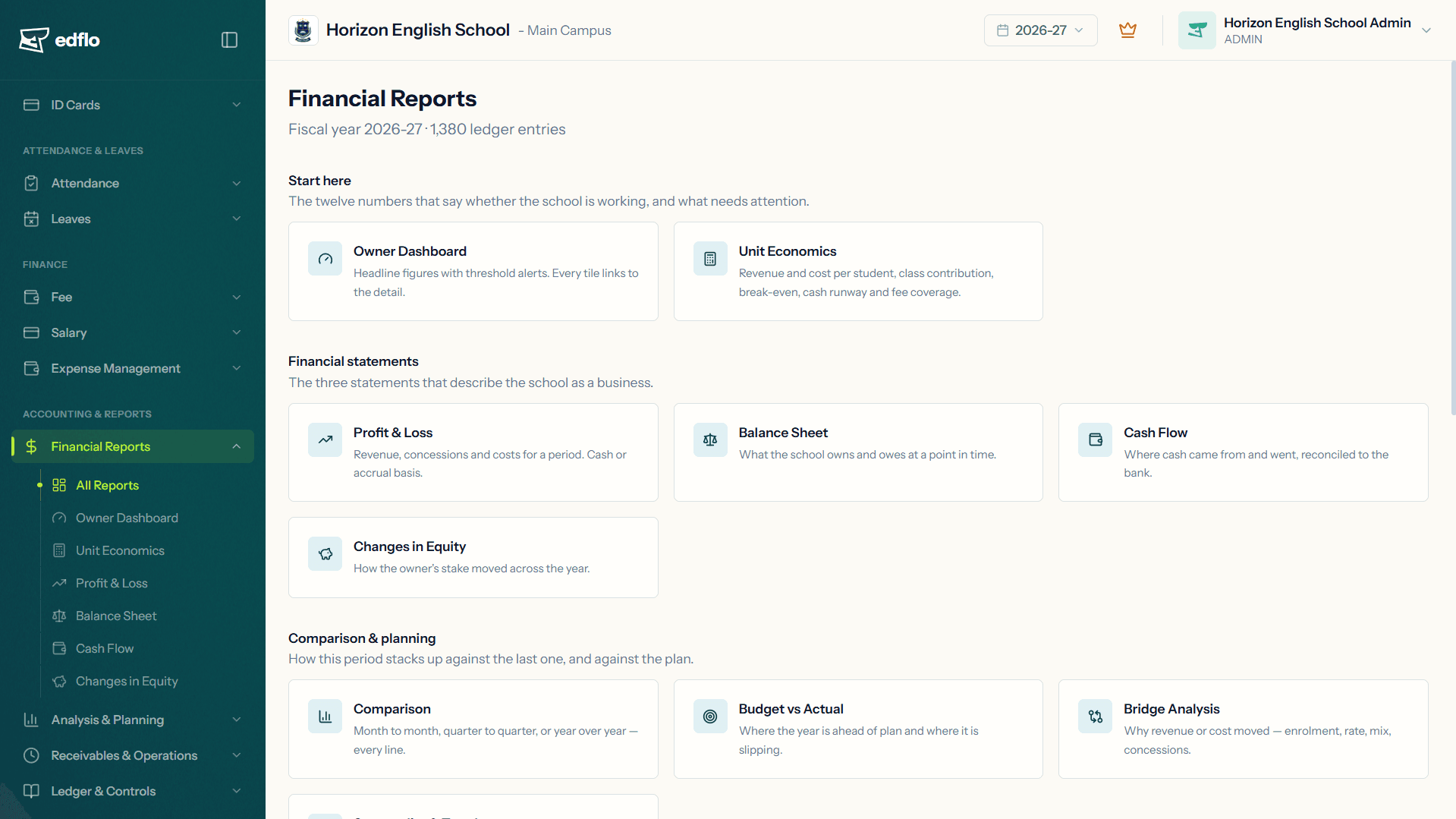
Most school software keeps the fee register and leaves the accounts to somebody else. In Edflo they are the same records. Fees, salaries and expenses post to the books when they are recorded, so the profit and loss, balance sheet and cash flow are ready when you open them, and your accountant starts from statements instead of a register to re-type. Accounting is included for every school, at every size, at no extra cost. There is no accounting add-on.
Accounts rebuilt from registers, once a month if at all
In most schools the books are a second copy of the fee register and the salary sheet, typed up by an accountant after the month has ended. Every figure is a transcription, every statement is weeks old, and nobody can trace a number back to the payment that produced it.
- ×Vouchers typed up from the fee register and the salary sheet
- ×A profit figure that mixes cash collected with bills still owed
- ×No trail from a total back to the transaction behind it
- ×Last month's figures quietly changing after they were reported
How Edflo helps
The statements, always current
Fees, salaries and expenses post to a double-entry ledger as they happen, including fees parents pay through 1BILL, so the statements are current the moment you open them. The profit and loss runs on a cash or an accrual basis, and any line can sit beside last month, last quarter or last year.
- Profit & loss, on a cash or accrual basis
- Balance sheet, cash flow and changes in equity
- Trial balance: every account, debits against credits
- Several cash, bank and mobile-wallet accounts, each collection landing in the right one
A ledger you can trace, and months you can close
Every figure traces back to the entries that produced it, and the journal is the audit trail. Anything that is not a fee, a salary or an expense goes in as a manual journal entry, which will not save unless it balances. Closing a month freezes it, so what you reported to the board stays what you reported.
- General ledger: one account, every posting, with a running balance
- A journal of every entry, automatic and manual
- Manual entries that must balance before they save
- Period close that freezes a month
Expenses and assets, on the same books
Expenses are recorded with the date, vendor, payment method and a receipt, in categories your school defines, and can be marked unpaid when bought on credit. Fixed assets sit in a register, and their depreciation posts itself every month.
- Receipts attached as an image or PDF, up to 5 MB
- Expense analysis by category and vendor, month by month
- A fixed asset register with straight-line depreciation
- Disposals, with the gain or loss worked out
Statements your accountant can work from
Print any statement or export it. Reading the books and changing them are separate permissions, so a finance manager can see every report without being able to restate one.
- PDF on the school's letterhead: logo, name, campus, address, contact details and registration number, with page numbers
- Prepared-by and approved-by lines on the profit and loss, balance sheet, cash flow, changes in equity and trial balance
- CSV that opens correctly in Excel
- Separate permissions to read the books and to change them
What the accounts office gets
Frequently asked questions
What is the difference between the cash and accrual basis?
On the cash basis, the profit and loss counts fees when they are collected and costs when they are paid. On the accrual basis, it counts fees in the period they are billed for and costs in the period they are incurred, whether or not the money has moved yet. Edflo produces both from the same books.
What appears on the printed statements?
Your school's letterhead: logo, name, campus, address, contact details and registration number, with page numbers. The profit and loss, balance sheet, cash flow, changes in equity and trial balance also carry prepared-by and approved-by lines for sign-off. Every report also exports as CSV, which opens correctly in Excel.
Which depreciation method does Edflo use?
Straight-line, posted every month on its own. Assets fall into five classes: land and buildings, furniture and fixtures, IT equipment, vehicles, and library books. Reducing-balance depreciation and your own asset classes are not available.
Can we post our own journal entries?
Yes, for anything that is not already a fee, a salary or an expense. A manual entry will not save unless its debits and credits balance, and it sits in the journal with every other entry as part of the audit trail.
What does closing a month do?
It freezes that month. Anything posted afterwards that belongs to it rolls forward into the next open month, instead of restating figures you have already reported.
Can we rename accounts in the chart of accounts?
Yes, the names are yours to change. Account codes and types are fixed, because the code decides which line of which statement an account appears on.
We are halfway through the year. Can we still start?
Yes. Enter an opening balance from four figures: cash in each account, fees owed to the school, salaries owed, and deposits held. The books run from there. Earlier years are not rebuilt.
Does Edflo handle FBR or tax filing?
No. Edflo keeps the books, in PKR, and produces the statements. Tax filing and signing off the accounts stay with your accountant, who now starts from posted statements instead of a fee register.
Can we export all of our financial data?
Yes. Every report exports as CSV, and a full export of your school's data is available on request at any time during your subscription, at no charge, within 7 working days. Your school owns its data. The full policy is published at /data-ownership.
Get the Edflo app
Admin, teacher and parent apps, on iOS and Android.
See Edflo in action at your school
Start a 15-day free trial, no credit card required. Or book a quick demo and we'll show you around.