Comparison
Google Forms collects answers. A school needs what happens next.
An Edflo form is one link that opens on any phone, like the form you use now. The difference is where the answers land: beside your students, with an owner, a follow-up date and an enrol button.
Plenty of schools take admission enquiries on a Google Form, and for good reason. It is quick to build, easy to share, and for a sports day headcount or a staff survey it is all you need. Admissions are different. An enquiry is the first step of an enrolment, and what matters is everything after the parent presses submit: who rings them back, which advert brought them in, and whether their child's details get typed out a second time. That part is what Edflo was built for.
Everything this page says about Google Forms comes from Google’s own help pages, last checked . Sources: question types and file uploads · response validation · branching by section · sharing, embedding and one-response limits · viewing responses · responses in Sheets.
Where the Google Form ends and the typing begins
A Google Form finishes its job the moment the parent presses submit. The answers wait in a summary inside the form or in a linked Google Sheet, and from there the work is a person at a desk: reading the rows, ringing the parents, guessing which advert paid off, and typing each child into the school system all over again.
- ×A class dropdown typed in by hand, and edited by hand whenever a section changes
- ×The same parent enquiring twice, arriving as two rows nobody connects
- ×A file upload question that asks parents to sign in to a Google Account first
- ×No signature question, so permission slips still go home on paper
- ×Enquiries copied from the sheet into the school system one row at a time
How Edflo helps
Everything you rely on in a Google Form is still here
Switching should not cost you anything you use today. Edflo has an equivalent for every question type on Google's own list, from short answers and checkboxes to grids, scales, dates and file uploads. Forms can run across several pages and send a parent to a different page based on an answer, and Edflo can also show or hide a single question, such as asking about the bus route only when they said they need transport.
- 27 question types, covering every type Google lists
- Multi-page forms, branching by answer, and conditional questions
- Share one link, print its QR code, or embed the form in your school website
- Responses export to CSV or Excel whenever you want a spreadsheet
Questions that already know what a school is
Google Forms can check an answer against a regular expression, if somebody at the school can write one. Edflo's CNIC and B-Form question already knows the shape of the number. The class dropdown is your school's own class list, and the section list narrows to the class the parent picked. A permission slip can be signed on the screen, and a parent can attach a B-Form photograph without signing in to anything.
- CNIC and B-Form numbers that validate themselves
- Class and section lists drawn from your school, never retyped
- A real signature pad for consent and permission slips
- Document uploads with no account, no sign-in and nothing to download
What happens after the parent presses submit
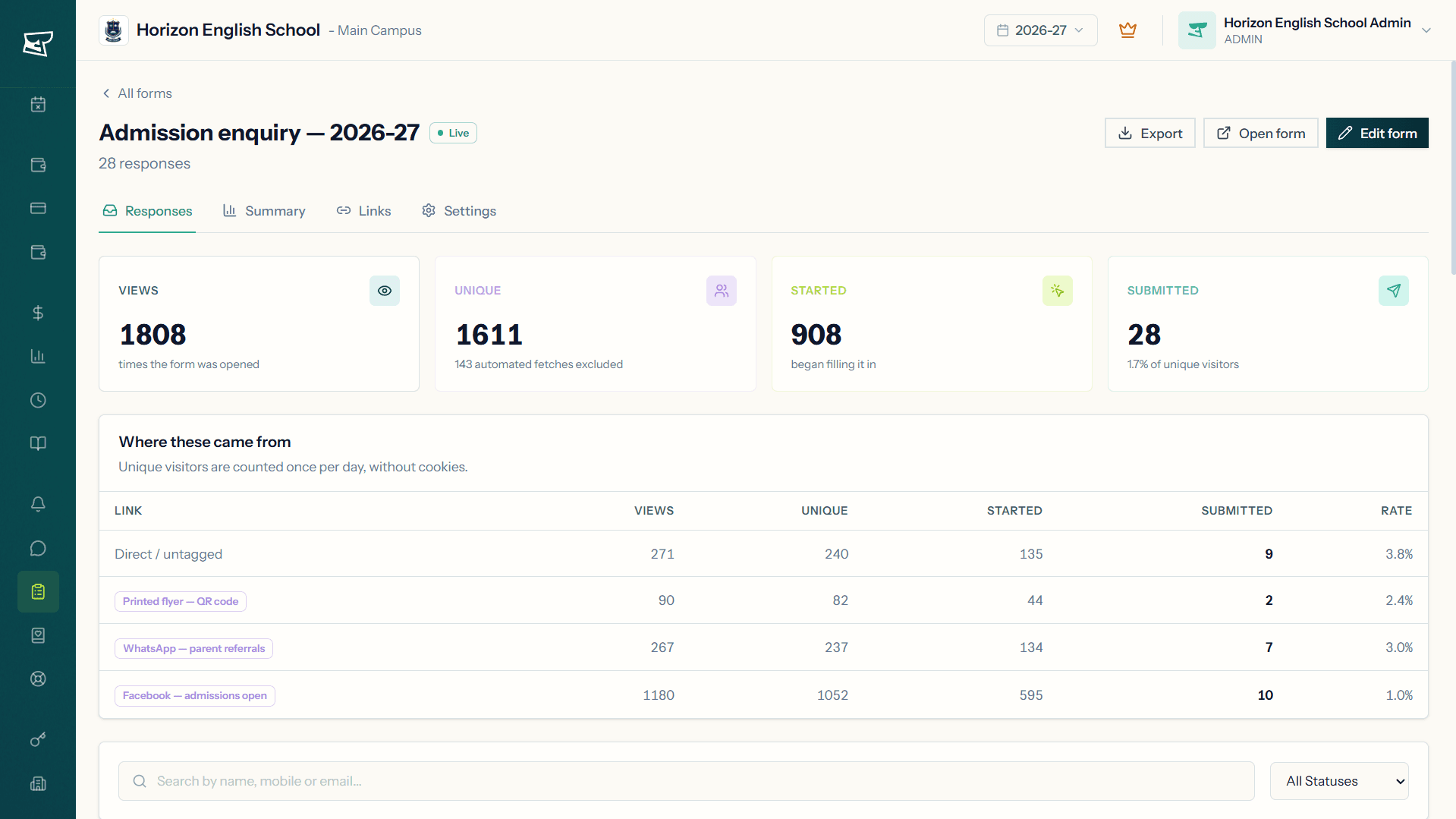
This is where the two really part ways. Each enquiry arrives in Edflo as a lead with a status, an owner and a follow-up date, beside the students it may soon join. A parent who enquires twice is flagged against their mobile number rather than turned away. Behind every campaign link, Edflo counts who opened the form as well as who finished it, and when the family says yes, the enrolment form opens already filled in.
- New → In review → Contacted, with an owner, a follow-up date and notes
- Repeat enquiries flagged on the parent's mobile number, never refused
- Views, Unique visitors, Starts, Submissions for every campaign link
- Enrol from the enquiry, with nothing typed twice
What you keep, and what you gain
Frequently asked questions
Is Google Forms a bad choice for a school?
No. For a quick headcount, a staff survey or a one-off event, Google Forms is fast and familiar, and there is no reason to move those. The case for Edflo is admissions, and any other form where the answer has to become part of a student's record rather than a row in a spreadsheet.
Do parents need a Google account to fill in an Edflo form?
No. An Edflo form opens from its link on forms.edflo.io on any phone, with no account, no sign-in and nothing to download, and that includes uploading a document. In Google Forms, a file upload question asks respondents to sign in to a Google Account, and so does limiting each person to one response.
Can Edflo do branching like Google Forms?
Yes. Google Forms can send a respondent to a different section based on their answer to a multiple choice or dropdown question, and Edflo can send a parent to a different page in the same way. Edflo can also show or hide an individual question based on earlier answers, combining several conditions where you need them.
Can we import our existing Google Form into Edflo?
Not automatically. The quicker route is to start from one of Edflo's 8 templates, such as the admission enquiry, which already asks for the child, the class and the parent's details, and change the questions that differ from your old form.
How do we see which advert brought each enquiry?
Give each campaign its own named link. Google Forms reports on the people who responded; Edflo reports views, unique visitors, starts, submissions and a conversion rate for each link separately, so you can tell an advert nobody clicked from a form people opened and abandoned. Unique visitors are counted per day and without cookies, so nothing is stored on the visitor's device. Two people sharing one office connection count as one, and the same parent returning tomorrow counts again.
Can we still get our responses in a spreadsheet?
Yes. Every form exports to CSV or Excel whenever you want it. The difference is that you no longer have to work from it: the follow-up, the owner and the enrolment already live on the enquiry itself.
Do we pay extra for forms in Edflo?
No. Included in Premium at every school size, at no extra cost. No cap on how many forms you build, how many responses you collect, or how many campaign links you track.
Where are enquiries kept, and who owns them?
With the rest of your school's records in Edflo. Your school owns its data. Edflo stores and processes it on your behalf and never sells it or shares it with third parties for marketing. You can export your data at any time, and the full policy is published at /data-ownership.
Get the Edflo app
Admin, teacher and parent apps, on iOS and Android.
See Edflo in action at your school
Start a 15-day free trial, no credit card required. Or book a quick demo and we'll show you around.