Behaviour
Student behaviour management system
Teachers log appreciation and concerns from their phone. The staff record stays inside the school, and each family reads a message about their own child, acknowledges it and can reply.
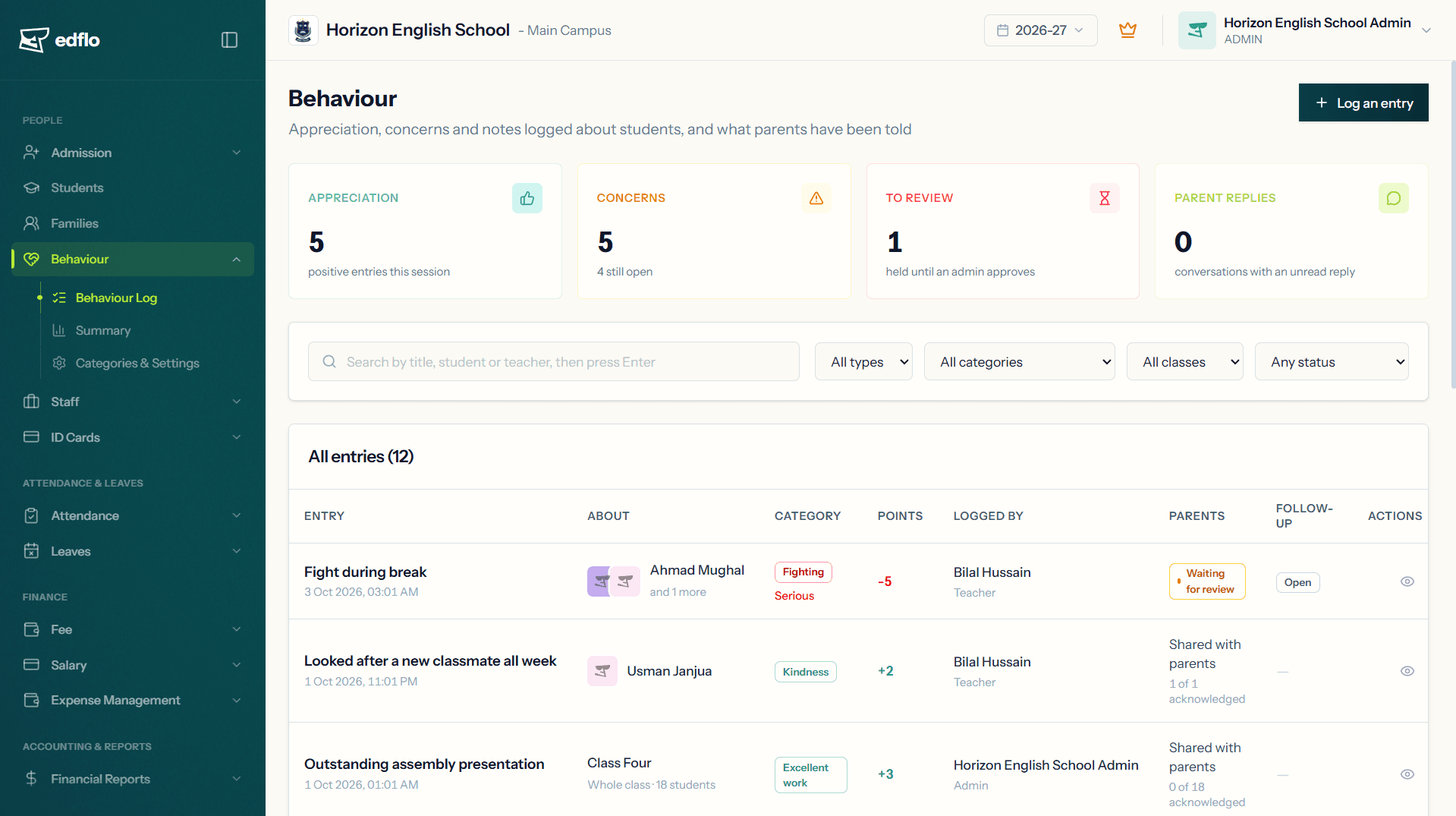
Edflo's behaviour module replaces the register, the diary note and the phone call with one log the whole school can see. Every entry carries two texts: what happened, written for staff, and a message written for the family. Parents are told about their own child only, in the Edflo app, and the office can see who has read it.
Why behaviour records go missing
A note about a child's conduct usually lives in a teacher's diary, a register or a phone call. The office never sees it, the next teacher never hears of it, and when a parent asks what happened last month, nobody can say.
- ×Incidents recorded on paper the office never sees
- ×Parents hearing about a problem weeks too late, or by rumour
- ×One honest record and one polite version, written in the same notebook
- ×No way to tell whether a parent has read a note sent home
How Edflo helps
Two texts, so staff can write the truth
Each entry has a staff record, which never leaves the school, and a separate message to parents, written for the family. A box parents could read would be a box nobody dares write the truth in. Staff notes and the follow-up stay with staff too.
- Staff record: the full account, never sent to parents
- Message to parents: what the family reads in the app
- Staff notes and follow-up, between staff only
- Up to 5 photos or PDFs per entry, each with its own "parents can see" switch
Each family hears about its own child
Log one entry against a student, several students, a section or a whole class. A class-wide entry is sent to every family separately, naming only their child. No parent sees which other children were on it.
- One entry for a whole class, a separate notice for each family
- Each family acknowledges and replies on its own
- The notification names the child and the title, never the message, because it can be read on a locked phone
Parents acknowledge, and you can see who has
Parents read the entry in the Edflo app, tap to acknowledge it, and can reply in a conversation attached to that entry. Ask them to do something, such as come in to meet the class teacher, with a date, and it stays in their app until they acknowledge it.
- Acknowledged, Seen or Not opened, for every child on the entry
- A conversation with the parents on each entry
- Ask parents to do something, by a date
- Print a letter for the family, one per child
A senior eye on serious concerns
Choose how serious a teacher's concern must be before it waits for an admin. The admin approves it, which shares it with the family, or returns it to the teacher with a note. Admins can be alerted about serious concerns, and when a student reaches a set number of concerns in a set number of days.
- Review from Minor to Critical, or never
- Approve, or return to the teacher with a note
- Alerts for serious concerns and repeated ones
- Once a family has acknowledged or replied, the teacher can no longer change the entry
Appreciation counts too
Behaviour is not only discipline. Appreciation is logged the same way and reaches parents as "Good news from school". If you use merit points, each category adds or takes away points and every student has a running total for the session.
- Starts with categories such as kindness, helping others, excellent work and late to class and incomplete homework
- Add your own categories, or switch any off
- Merit points if you want them, off if you do not
- A parent's total counts only what was shared with them
The record, whenever you need it
Every student's profile has a Behaviour card for the session. The summary shows what is being logged, week by week, by category and by class, and which students have reached your repeat-alert number of concerns.
- A Behaviour card on every student profile
- Summary for a class, this session, or the last 30 or 90 days
- Session record printed in a parents' version and a school copy
What changes for the school
Frequently asked questions
Do parents see what teachers write?
Only the message written for them. Every entry has a staff record that never leaves the school, and a separate message to parents. Staff notes, the follow-up and which other children were on the entry are never shown to a family.
Can we log one incident for a whole class?
Yes. Log it against a whole class or a section, and every active student in it is added. Each family is notified separately, about their own child only, and acknowledges and replies on its own.
Can a teacher's entry be checked before parents see it?
Yes. Choose a level, from minor, moderate, serious, critical, and a teacher's concern at or above it waits for an admin. The admin approves it, which notifies the parents, or returns it to the teacher with a note. Appreciation and entries kept to staff are never held.
Can parents reply?
Yes, if you allow it. Each entry has its own conversation with that child's parents, and whoever logged the entry is notified when they write. Once an entry is marked resolved, parents can still read the conversation but can no longer write in it.
Do we have to use merit points?
No. Points are a setting. With them on, each category carries its usual points and every student has a running total for the session. With them off, entries are logged without a score.
Will parents see entries as soon as we start?
No. Sharing with parents is off until the school switches it on, so you can start by logging for staff only. Once it is on, each entry is shared or kept to staff, as the person logging it chooses.
Can we print a letter for the parents?
Yes. Any entry prints as a notice for the family, one per student, naming only that child and carrying only the message to parents. A student's session record prints in two versions: one for parents, listing only what the family has been shown, and a school copy.
Do teachers log behaviour from their phone?
Yes, from the Edflo app, using the same form as the admin panel. A teacher sees the entries they logged. Admins can also log, review, follow up and reply from the app. Settings, categories, the summary and printing are in the admin panel.
Get the Edflo app
Admin, teacher and parent apps, on iOS and Android.
See Edflo in action at your school
Start a 15-day free trial, no credit card required. Or book a quick demo and we'll show you around.