Finance
Parents Send Fee Screenshots on WhatsApp. How to Check Them Properly
In many Pakistani schools, a fee paid by bank transfer arrives as a screenshot on WhatsApp: to the office number, to the accountant's personal phone, sometimes to a class teacher. Somebody at the school then has to match it against the bank account, find the right student, and record the payment by hand. Most of the time it works. When it does not, a fee is recorded twice, a payment is never recorded at all, or a parent who did pay receives a reminder and an angry phone call follows. This article covers how to check a transfer properly, and how to receive receipts in a way that does not depend on somebody's chat history.
A screenshot is a claim, not a payment
A screenshot shows what was on a phone screen. It does not show that the money reached the school's account. Screenshots can be of a transfer that later failed, of a transfer to a different account, of an old payment sent again, or edited. None of this needs a dishonest parent: a parent who paid two children's fees can easily send the same screenshot twice.
The only proof that a fee was paid is the school's own bank statement. Treat every screenshot as a parent saying they have paid, and check it against the statement before anything is marked as paid.
What to check on every transfer
- The amount on the statement matches what the fees owe, or you know why it does not
- The money arrived in the school's account, not a different one
- The date on the statement is close to the date the parent gave
- The transaction reference on the statement matches the one on the receipt
- The same reference has not already been recorded against another payment
- You know which student, and which months, the payment is for
Signs worth a second look
None of these proves anything on its own. They are reasons to check the statement before recording the fee, which you should be doing anyway.
- A receipt with no transaction reference, or one cropped so it is cut off
- A round amount that does not match any fee the family owes
- The same image sent for two different fees or two different months
- A payment the parent says was made, but that does not appear on the statement after a working day
- Fonts or alignment that look different from the bank's usual receipts
Why WhatsApp makes it harder
The checks above are simple. What makes them hard is where the screenshots arrive. Receipts are spread across several phones, mixed in with every other message, and gone when a staff member leaves or changes their number. There is no list of what is waiting, no record of who checked what, and no way for a parent to see that the school has received their receipt.
Whatever system you use, aim for three things: every receipt arrives in one place, nothing is marked paid until someone has checked the statement, and the parent hears back either way.
Where Edflo fits
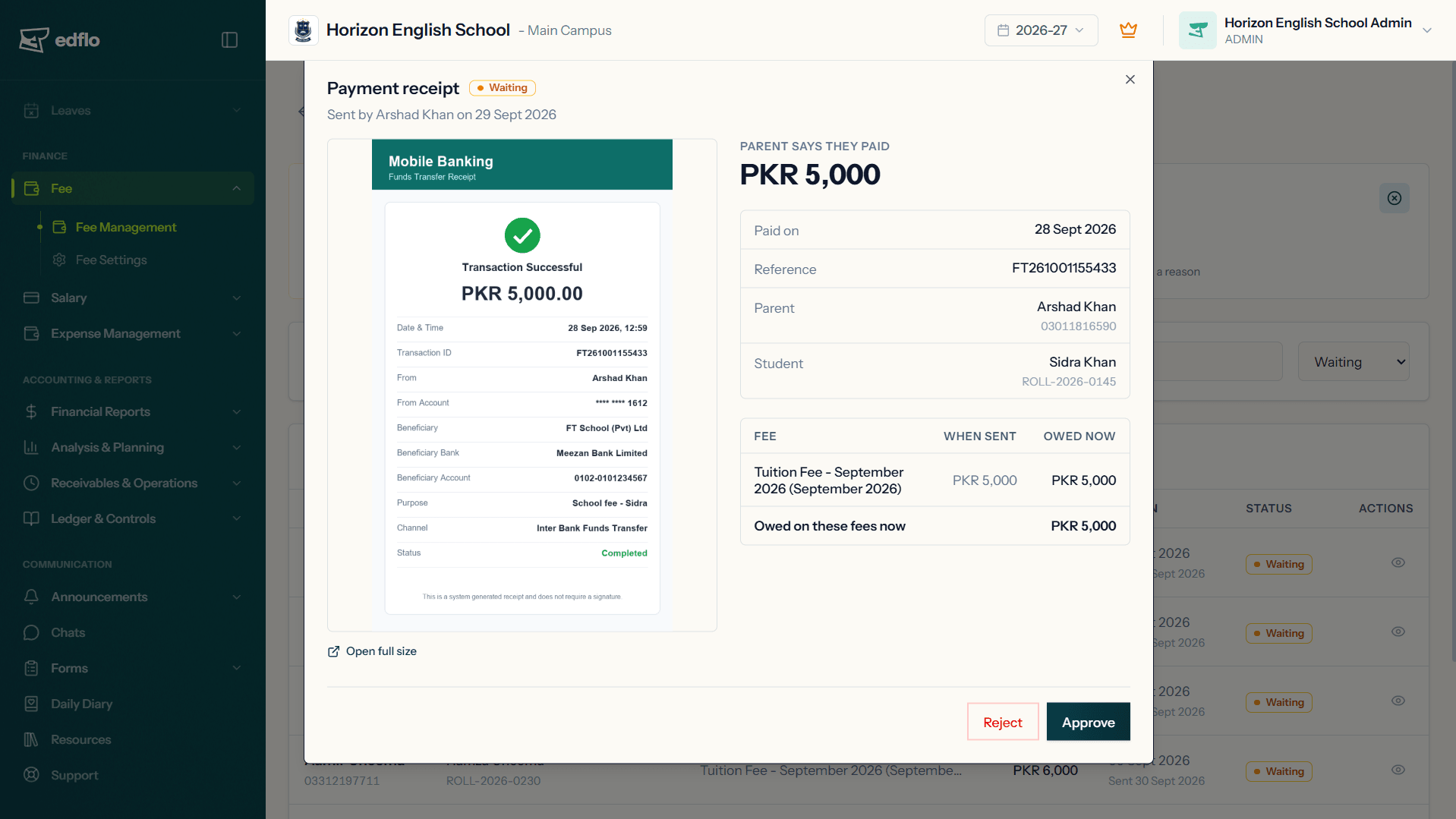
In Edflo, a parent who paid by bank transfer taps "I've paid" on an unpaid fee in the app, ticks the fees the transfer covered, and attaches the bank's receipt. The parent does not type an amount: it is worked out from the fees they tick. Every receipt arrives in one list for the office, and staff with access to fees are notified.
Nothing is marked paid while a receipt waits. The office checks it against the bank statement and approves it, which records the payment like one taken at the counter, into the bank account the money actually reached, and sends the parent their receipt. Or the office rejects it with a reason, which the parent sees. The review window warns when the same receipt file or the same transaction reference has been sent before. Edflo never sees the school's bank account, so the check against the statement stays with the office, which is where it belongs.
Key takeaways
- A screenshot is a parent's claim that they paid. The bank statement is the proof.
- Check amount, receiving account, date and transaction reference before recording a fee.
- Check that the reference has not already been recorded, so one payment is not counted twice.
- Get every receipt into one place, not spread across staff phones.
- Tell the parent when a receipt is accepted, and why when it is not.
Frequently asked questions
How can a school verify a fee paid by bank transfer?
Check it against the school's own bank statement, not the screenshot. Confirm the amount, that it reached the school's account, the date, and that the transaction reference matches the receipt and has not already been recorded against another payment. Only then record the fee as paid.
Is a screenshot of a bank transfer proof of payment?
Not on its own. It shows what was on the parent's screen, which may be a transfer that failed, went to another account, or was already recorded. Treat it as the parent telling you they paid, and confirm it on the bank statement.
How do we stop the same payment being recorded twice?
Record the bank's transaction reference with every transfer, and check new receipts against the references already recorded. A parent paying for two children or two months can easily send the same screenshot twice without meaning to.
Can Edflo tell if a receipt has been edited?
No, and no school system honestly can from a picture alone. Edflo warns when the same receipt file or the same transaction reference has been sent before, and it never marks a fee paid until someone at the school has checked the payment against the bank statement and approved it.