HR & Payroll
School HR & payroll software
Process teacher salaries in a few clicks, issue digital payslips, and manage staff records and leave. Payroll reflects real attendance without anyone cross-checking a register.
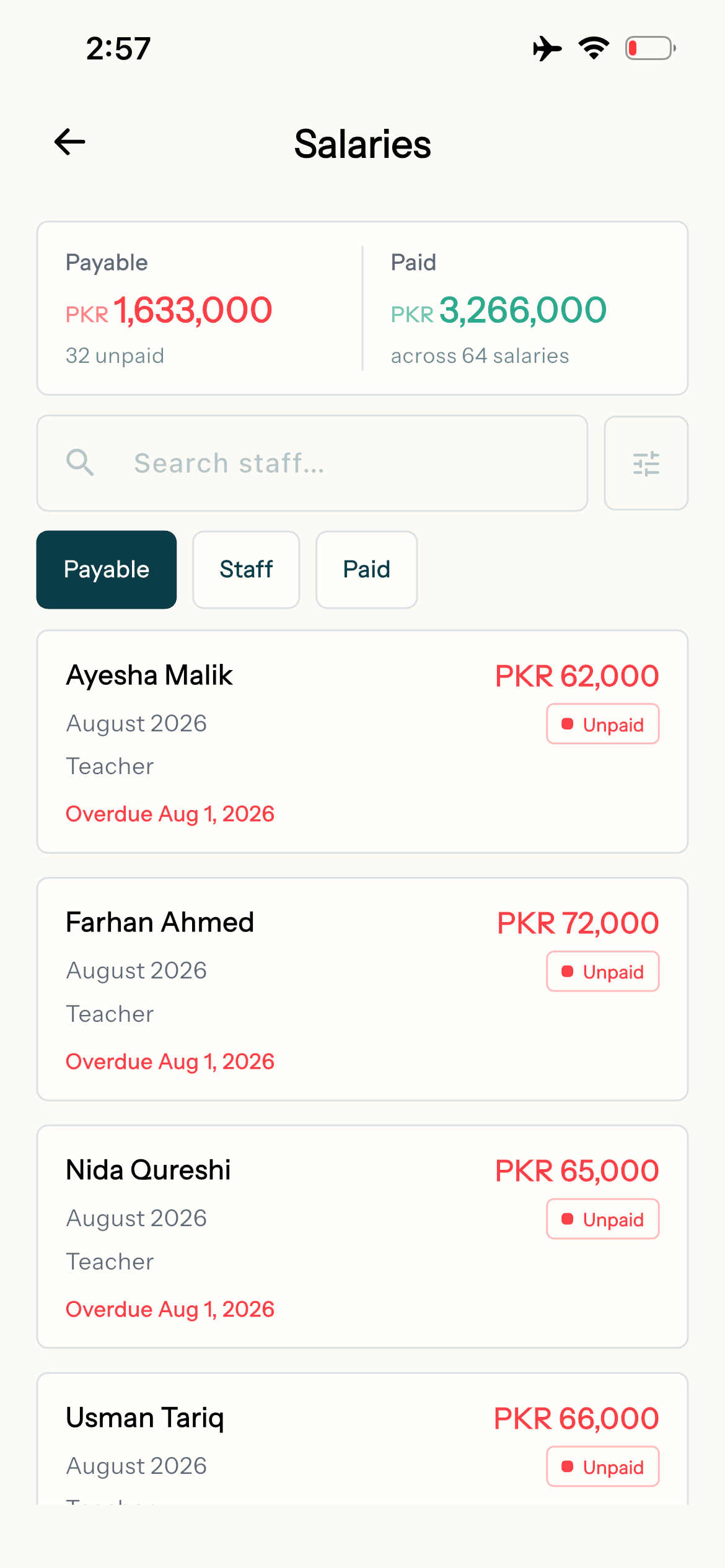
Edflo gives schools one home for staff records, salary processing, leave and payslips. Because it links directly to attendance, payroll is accurate by default. That saves your admin team hours and heads off the salary disputes nobody enjoys having.
Staff admin shouldn't eat your week
Maintaining staff files, calculating salaries against leave and attendance, and printing payslips by hand is slow and easy to get wrong. Every mistake becomes a trust issue with your team.
- ×Staff records scattered across files and folders
- ×Salaries calculated manually against leave and attendance
- ×Payslips printed or written by hand each month
- ×Leave requests tracked over paper or chat
How Edflo helps
Every contract, degree and CNIC, filed against the person
Keep the paper a school holds on its staff in Edflo, next to the person it belongs to: the employment contract, the degree they were hired on, the CNIC scan, experience letters. Give a document an expiry date and it is flagged before it runs out. Students' B-Forms and certificates are filed the same way.
- Nine categories, from contracts to identity and medical records
- Flagged as expiring 30 days before the date
- Shown on the staff member's or student's profile
- Shared with your admins, or private to you
- Files up to 25 MB: PDF, image, Word, Excel, PowerPoint, text, CSV or ZIP
Automated, accurate payroll
Process monthly salaries in a few clicks, with deductions and allowances handled automatically and payroll that draws directly from attendance data.
- Automated salary processing and digital payslips
- Attendance-linked payroll for accuracy
- Allowances, deductions and bonuses built in
Simple leave management
Staff request leave in the app, approvals are tracked, and balances update on their own. It all flows into payroll, so nothing gets miscounted.
- Digital leave requests and approvals
- Automatic leave balances
- Leave that reflects correctly in salaries
What payroll really costs
Salaries post to the school's books as they are paid, and the payroll report shows what they add up to: the salary register, cost by department, deductions, the security deposits the school holds, and the pay lost to absence. The owner's dashboard shows payroll as a share of net revenue.
- Salary register and cost by department
- Deductions and security deposits held
- Pay lost to absence
- Payroll as a share of fee income, on the owner's dashboard
What HR teams gain
Frequently asked questions
Does Edflo automate teacher payroll?
Yes. Edflo processes monthly salaries in a few clicks, applying allowances and deductions automatically and issuing digital payslips to each staff member.
Is payroll linked to attendance?
Yes. Staff attendance and leave feed directly into payroll, so salaries are accurate by default without manual cross-checking.
Can staff request leave in the app?
Yes. Staff submit leave requests digitally, managers approve them, and balances update automatically and reflect in payroll.
Where are staff documents stored?
In Documents, in the admin panel, filed against the staff member and shown on their profile. Documents is off by default for every admin, the principal included, and is given to each one deliberately, because it holds contracts and ID scans. Each document is shared with those admins or private to whoever uploaded it. Teachers, parents and students never see it, so a teacher cannot see the school's file on them.
Can we keep students' B-Forms and certificates too?
Yes. File a document against a student and it appears on their profile. Students are listed with their registration number, so two children with the same name cannot be confused. Documents can also be kept against no one in particular, for the school's own filing.
Will Edflo tell us when a contract is about to expire?
Yes, on screen. A document with an expiry date is flagged 30 days before it, the Documents screen counts how many have expired or are expiring, and one filter shows only those. When a contract is renewed, upload the new one and keep the old one as the record of what was agreed before.
Can we see payroll as a share of fee income?
Yes. The owner's dashboard shows the payroll ratio: payroll as a share of net revenue. Edflo flags it above 60% by default, and as critical above 75%. Those are Edflo's default lines, a prompt to look rather than a benchmark every school should meet.
Get the Edflo app
Admin, teacher and parent apps, on iOS and Android.
Explore more of Edflo
Complete school finance in one place.
Staff attendance with geofencing.
The payroll ratio on the owner's dashboard.
Running teacher salaries without spreadsheets.
What share of fees should go to salaries.
What every teacher's personnel file should hold.
See Edflo in action at your school
Start a 15-day free trial, no credit card required. Or book a quick demo and we'll show you around.