Operations
Sharing Worksheets With Parents Without Another WhatsApp Group
Most schools in Pakistan send notes, worksheets and past papers home the same way: a teacher posts them in a class WhatsApp group. It costs nothing and everyone already has the app. It also means the worksheet is buried under forty messages by the evening, a parent who joined late never sees it, Section A's notes reach Section B, and every parent's phone number is visible to every other parent and to staff who have since left. There is a better arrangement, and it does not need to be complicated.
What goes wrong with class groups
- Files are buried under replies, reminders and good-morning messages within hours
- A parent who joins the group later cannot see anything sent before
- Material meant for one section reaches every section in the group
- Every parent's number is visible to every other parent
- Former staff often remain in the group, with every family's number
- There is no record of what was sent, and nothing to find at exam time
What a better arrangement looks like
- One place where every worksheet and set of notes lives, organised by subject and category
- Each item sent to exactly the classes or sections it is for
- A notification when something new is added, sent once rather than repeated
- Parents can find old material when they need it, such as a syllabus in exam week
- No parent can see another parent's number
Organising material so it can be found
Whatever you use, name things so a parent searching at ten at night can find them. Put the subject and the topic in the title, for example "Mathematics: Chapter 3, Fractions worksheet". Keep a small number of categories, such as notes, worksheets, syllabus and past papers, and use them consistently. And send links to videos rather than the videos themselves: they are too large to send around, and a link opens on any phone.
What WhatsApp groups are still good for
Groups are good at quick, informal back-and-forth. They are poor at anything that needs to be found again, sent to only some families, or kept private. Moving study material out of them leaves them for what they do well, and it makes the groups quieter, which most parents welcome.
Where Edflo fits
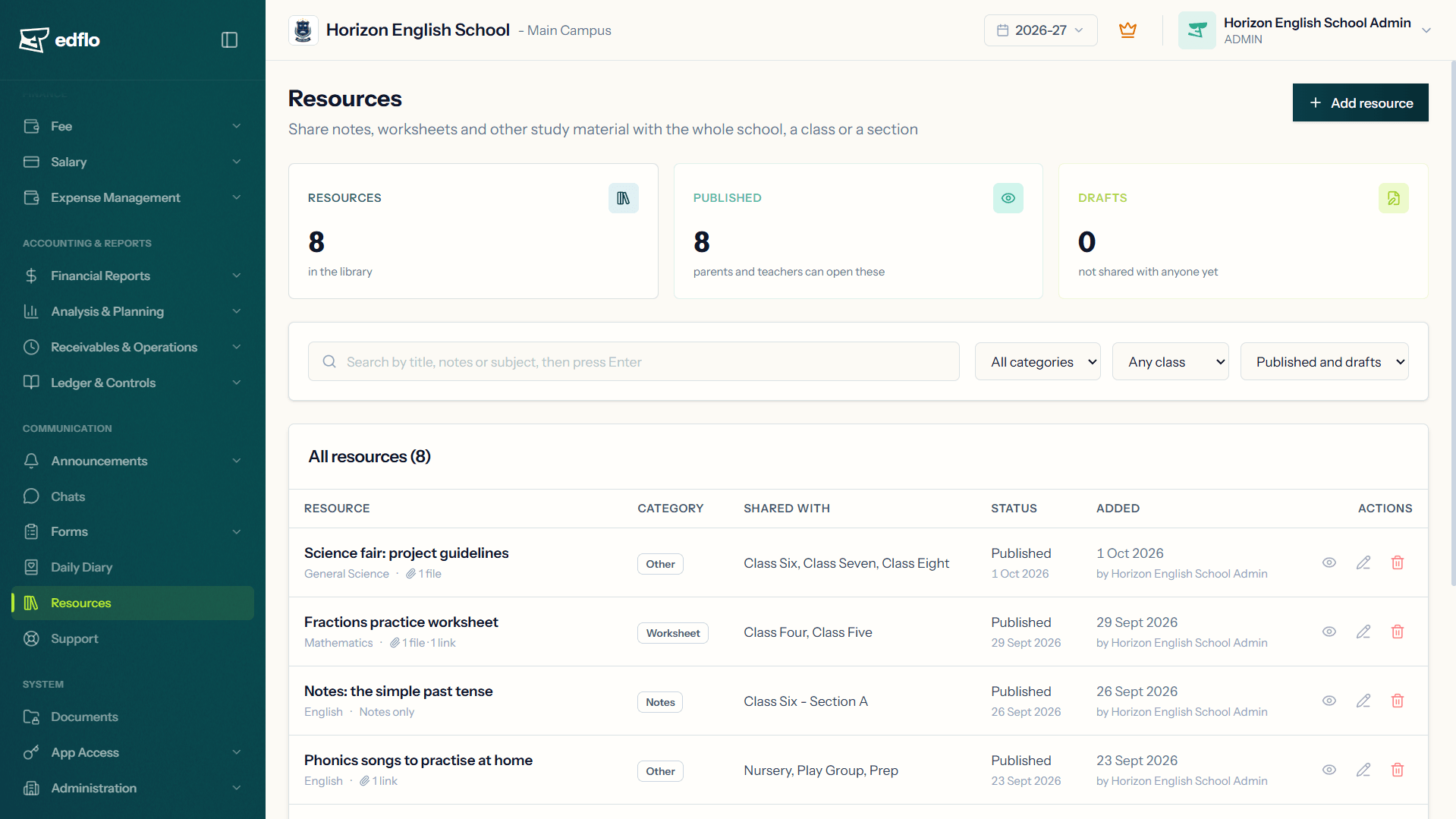
Edflo's resource library holds typed notes, PDFs, photos, Word, Excel, PowerPoint and text files, and links to videos or web pages. Each resource is shared with the whole school, with chosen classes or with single sections, and parents and teachers get one notification and open it in the Edflo app, filtered by child, subject and category. A parent sees only what was shared with their own child's class or section. Admins add resources, from the admin panel or their phone; teachers can open every published resource but cannot add them. It is a library for study material, not a system for setting and marking assignments.
Key takeaways
- Class WhatsApp groups bury files, reach the wrong sections and expose parents' numbers.
- Keep study material in one place, organised by subject and category.
- Send each item only to the classes or sections it is for.
- Name files so a parent can find them later, and send videos as links.
- Leave groups for quick conversation, which is what they are good at.
Frequently asked questions
How can a school share study material with parents?
Keep it in one place, organised by subject and category, and send each item only to the classes or sections it is for, with a notification when something new is added. A school app or a shared library does this better than a class WhatsApp group, where files are buried within hours.
What is wrong with sending worksheets in a class WhatsApp group?
Files are buried under other messages, parents who join later cannot see them, material reaches sections it was not meant for, and every parent's phone number is visible to every other parent and to staff who have left.
Can teachers add resources in Edflo?
Not at the moment. Admins add resources from the admin panel or the Edflo app, and teachers can open every published resource in the school.
Is Edflo's resource library an LMS?
No. It shares notes, worksheets, files and links with the right families. It does not set assignments, collect submissions, run quizzes or record grades.